
Self Service for MacOS

The Self-Service Application allows you to update or install preconfigured software onto your Apple Macintosh system .
Self-Service is located in the Applications folder. Software can be found in the Categories section on the left hand side of the application or using the Search box in the top left had corner.
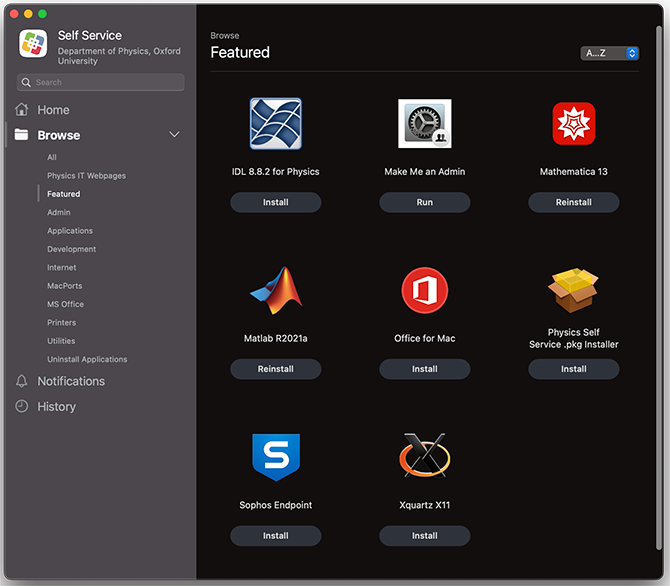
To install an item, click on its Install button. For extra information, click on the icon for the application.
If there is important information for you to read before proceeding it will be displayed to you.
What if the software I need isn't in Self Service?
On desktop systems you can also install any certified Apple installer .pkg files by clicking on "Physics Self Service .pkg Installer" in the Featured category.
On macOS systems you are able to install software from the Apple Apps Store if you sign in with your Apple ID account. If you need to purchase software from the Apple Apps Store then contact IT Support.
On macOS you should also be able to install any software or libraries you need into areas of the system disk that is writable by your user account, on desktops we recommend using the /Data directory for this. You should also use the /Data directory to store any datasets that you might need to download to the system.
If you still cannot install the software you need, desktop systems running macOS Catalina or above can run Make Me an Admin from the Self Service app. This will elevate your account to be an administrator for 30 minutes once a day. All changes to the system will be logged.
If Self Service isn't available on your University owned Apple system
If you have a university owned Apple system and you would enable Self Service along side your existing setup please email itsupport@physics.ox.ac.uk and we can take a look at your existing setup and enable the Self Service system.
Categories: Apple | Mac | Self Service